# Project scaffold · Tic Tac Toe on Chromia with Rell and Unity · Learn Chromia
> You will build the skeleton of the Tic Tac Toe game in Unity here. The game mechanics are mocked for now, so the focus is on layout and design.
Source: https://chromia.com/learn/tic-tac-toe/module-two/scaffold/
Tic Tac Toe on Chromia with Rell and UnityLesson 17 of 20
1. [01Tic Tac Toe on Chromia with Rell and Unity](https://chromia.com/learn/tic-tac-toe/introduction/)
2. [02Set up your project](https://chromia.com/learn/tic-tac-toe/setup/)
Module 1: A Rell backend with FT4 accounts
1. [03Overview](https://chromia.com/learn/tic-tac-toe/module-one/)
2. [04Part 1: Database design, operations and queries](https://chromia.com/learn/tic-tac-toe/module-one/data-modeling/)
3. [05Design the data model](https://chromia.com/learn/tic-tac-toe/module-one/data-modeling/tables/)
4. [06Perform basic operations](https://chromia.com/learn/tic-tac-toe/module-one/data-modeling/basic-operations/)
5. [07Write basic queries](https://chromia.com/learn/tic-tac-toe/module-one/data-modeling/write-queries/)
6. [08Part 2: Set up accounts](https://chromia.com/learn/tic-tac-toe/module-one/create-accounts/)
7. [09Configure FT4 accounts](https://chromia.com/learn/tic-tac-toe/module-one/create-accounts/install-configure-ft4/)
8. [10Authentication with FT4 accounts](https://chromia.com/learn/tic-tac-toe/module-one/create-accounts/authentication/)
9. [11Update tests](https://chromia.com/learn/tic-tac-toe/module-one/create-accounts/update-tests/)
10. [12Part 3: How the dapp project is organized](https://chromia.com/learn/tic-tac-toe/module-one/project-structure/)
11. [13Work with Rell modules](https://chromia.com/learn/tic-tac-toe/module-one/project-structure/modules/)
12. [14Add modules to your dapp](https://chromia.com/learn/tic-tac-toe/module-one/project-structure/incorporate-modules/)
Module 2: The Unity project
1. [15Overview](https://chromia.com/learn/tic-tac-toe/module-two/)
2. [16Set up the project](https://chromia.com/learn/tic-tac-toe/module-two/setup/)
3. [17Project scaffold](https://chromia.com/learn/tic-tac-toe/module-two/scaffold/)
4. [18Link the client to the blockchain](https://chromia.com/learn/tic-tac-toe/module-two/connecting-the-client/)
5. [19Summary and manual testing](https://chromia.com/learn/tic-tac-toe/module-two/summary-and-tests/)
1. [20What next?](https://chromia.com/learn/tic-tac-toe/what-next/)
[Learn](https://chromia.com/learn/)[Tic Tac Toe on Chromia with Rell and Unity](https://chromia.com/learn/tic-tac-toe/)
17 / 20Module 2: The Unity project
# Project scaffold
You will build the skeleton of the Tic Tac Toe game in Unity here. The game mechanics are mocked for now, so the focus is on layout and design.
## Overview
The game has three main parts:
1. **Game board**: a 3x3 grid where players place their marks.
2. **UI elements**: one button per grid cell, plus a text display that shows the game status.
3. **Game logic**: scripts that track whose turn it is, detect a winner, and maintain the game state.
## Set up the basic layout
### Pages
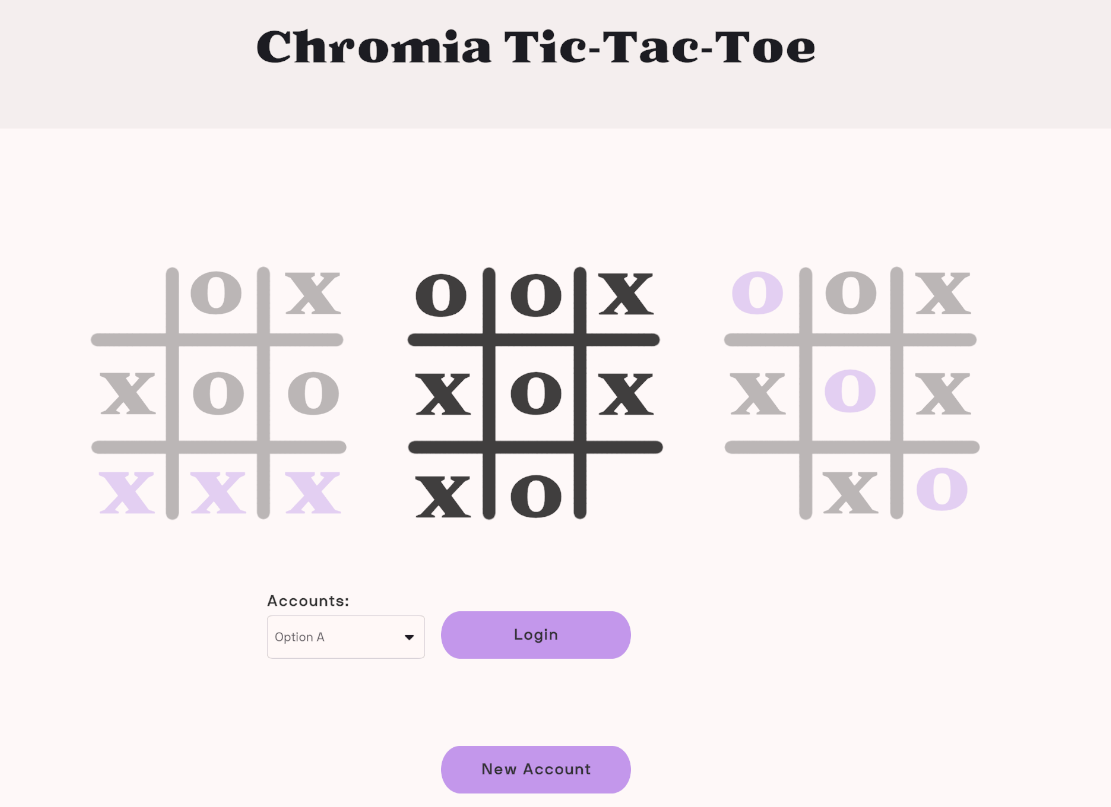
1. **Login page**
* Lets users either register a new account or sign in with an existing one.
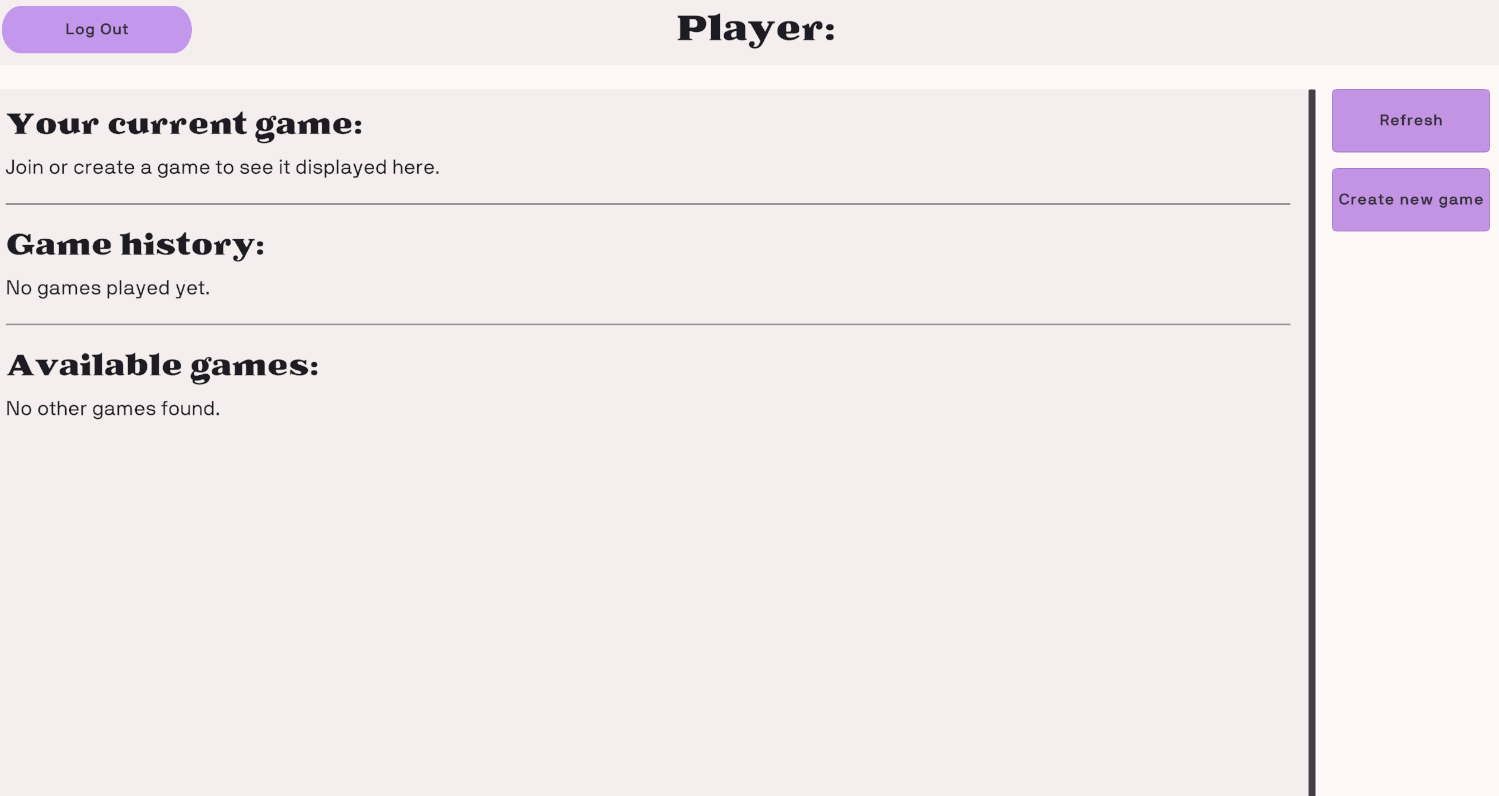
2. **Lobby page**
* Lists matches that are in progress and matches that have finished.
* Lets users start a new match or join one.
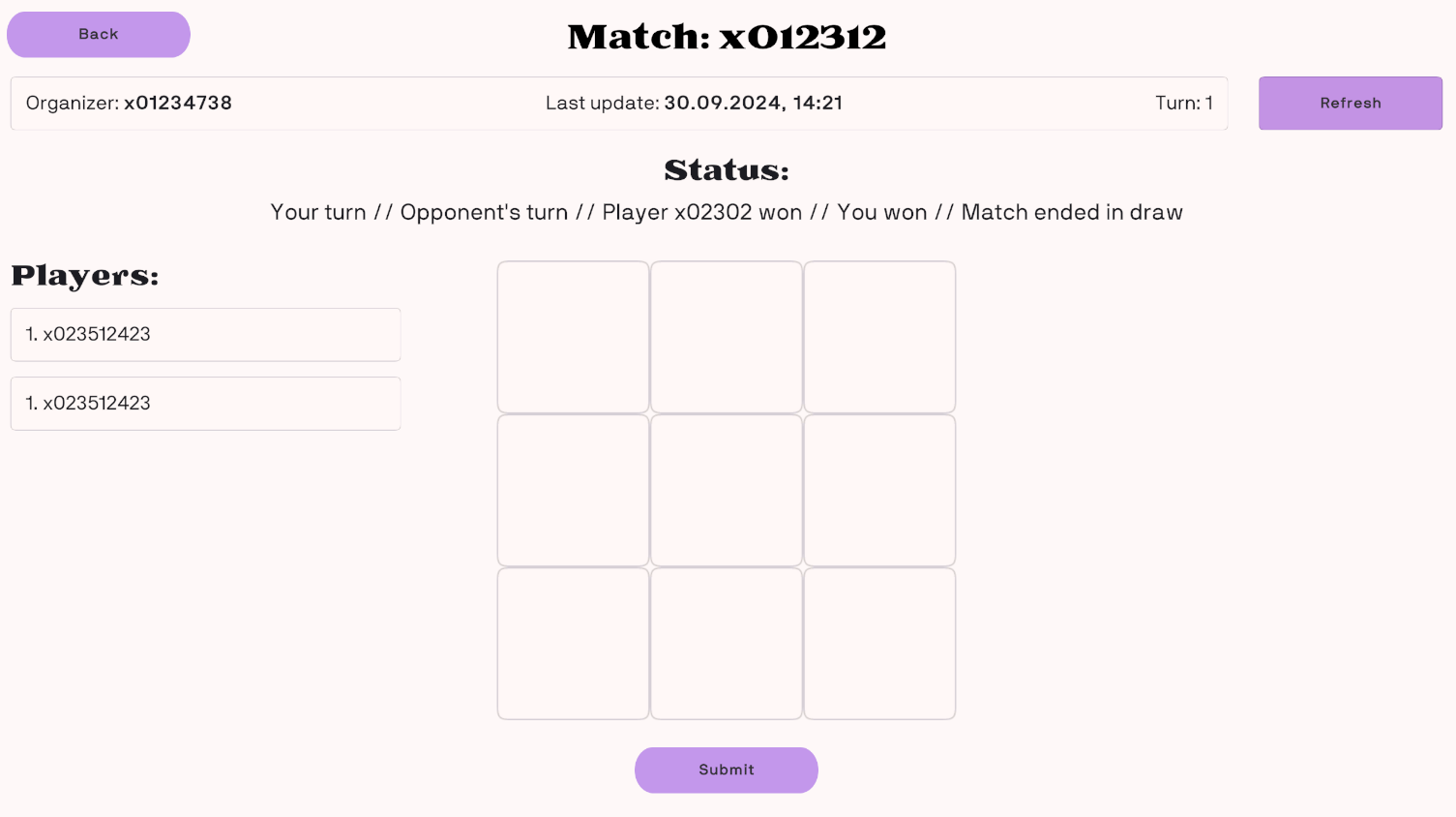
3. **Game page**
* Where the Tic-Tac-Toe match itself takes place.
* Contains the game board, the UI elements, and live updates as the game progresses.
### Set up the `ServiceLocator`
The `ServiceLocator` is a single place where the game's core services and managers are created and held. Other classes get those services from it instead of instantiating them repeatedly, which keeps the code modular.
#### Steps to set up the `ServiceLocator`:
1. **Create a `GameObject`:**
* Add an empty `GameObject` to your Unity scene.
* Give it a clear name, such as `ServiceLocator`.
* Attach the `ServiceLocator` script to it.
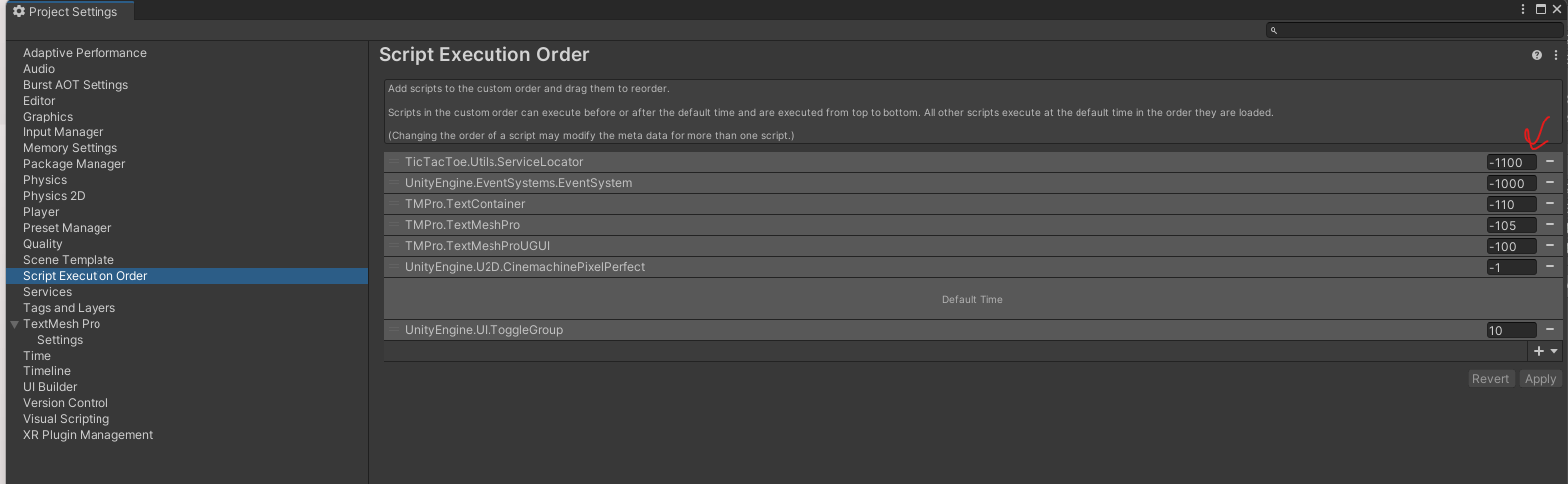
2. **Set script execution order:**
* Open **Edit → Project Settings → Script Execution Order**.
* Add the `ServiceLocator` script and drag it to the top of the list.
* Placing it first means it initializes before anything else, so its services are ready whenever other components request them.
3. **Understand the role of `ServiceLocator`:**
* Open the `ServiceLocator` script and look at what it contains. It creates instances of services such as `BlockchainService`, `GameService`, and `UIManager`, and the script's comments describe each one. A short summary follows:
#### Services in `ServiceLocator`
1. **`UIManager`:**
* Controls every UI element in the game, including menus, notifications, and interactions with the player interface.
* Because of the `[SerializeField]` attribute, you can assign the `UIManager` in the Unity editor.
csharp
```nolines
[field: SerializeField] public UIManager UIManager { get; private set; }
```
2. **`LocalStorageService`:**
* Stores data on the player's device and reads it back.
* Typical examples are player progress, game settings, and cached data.
* You create it inside the `SetupServices()` method:
csharp
```nolines
LocalStorageService = new LocalStorageService();
LocalStorageService.Initialize();
```
3. **`BlockchainService`:**
* Takes care of blockchain operations, such as connecting to a blockchain network and sending transactions.
* Its initialization can require network calls, so it runs asynchronously (`await BlockchainService.Initialize()`).
csharp
```nolines
BlockchainService = new BlockchainService();
await BlockchainService.Initialize();
```
4. **`GameService`:**
* Holds the core game logic and works with other services, for example using the blockchain to persist game state or submit transactions.
* It requires the `BlockchainService`, which you pass into its constructor when you create it:
csharp
```nolines
GameService = new GameService(BlockchainService);
```
## Create the game board
Use the following steps to start building the UI for your Tic Tac Toe game.
#### Set up the `UIManager`
First, create a `UIManager` to control the game's views (pages). It switches between views and acts as the parent container for all UI elements.
* **What it does**:
The `UIManager` contains several views, such as the login screen, the game board, and result screens. It reacts to events like button clicks to move from one page to another.
* **Example**:
A method in the `LoginView` could look like this:
csharp
```
public async void OnNewAccountButton()
{
var blockchainService = ServiceLocator.Instance.BlockchainService;
var newAccountData = await blockchainService.OpenStrategyRegisterAccount();
}
```
Here, the `BlockchainService` is used to create a new blockchain account.
#### Visualize the structure
* Your UI hierarchy should resemble the following:
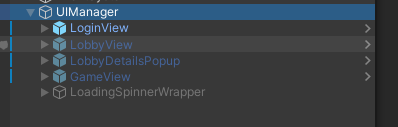
* Each view has a script containing the logic for its UI interactions, for example:

## Set up the game grid in Unity
1. #### Create an object
* In the `Editor` Hierarchy, add an empty `GameView` object as a child of the `UIManager`.
2. #### Add a `Canvas`
* Create a new `Canvas` from the **Hierarchy** panel. All of your UI elements will sit under it.
* Set the **Canvas** render mode to **Screen Space - Overlay**, the usual choice for a standard UI.
3. #### Add a `GridPanel`
* Add a `Panel` inside the `Canvas` and rename it `GridPanel`.
* Resize it to cover the area the game grid should occupy.
### Add a grid layout
1. Select `GridPanel` in the **Hierarchy**.
2. In the **Inspector**, add a **Grid Layout Group** component.
3. Configure the Grid Layout Group as follows:
* **Cell Size**: (100, 100), so every cell is the same size.
* **Spacing**: (5, 5), to leave a gap between cells.
* **Constraint**: select **Fixed Column Count** and set **Constraint Count** to `3`, which produces a 3x3 grid.
### Create buttons for the grid cells
1. Add a `Button` under `GridPanel` and rename it "Cell1".
2. Size the button to fit a cell (for example, 100x100).
3. Duplicate it eight times so you have nine buttons in total.
4. Give the copies sequential names ("Cell2", "Cell3", and so on).
### Add a status text
1. Add a `Text` element to the **Canvas** and place it above `GridPanel`.
2. Rename it `StatusText` and give it a starting value such as **"Player X's Turn"**.
3. Tweak the font size, alignment, and color so it is easy to read.
## Connect scripts to the UI
1. Write a script, such as `GameView`, that connects the UI to the game logic.
2. Give it methods that refresh the game grid and manage player turns.
3. Attach the script to an empty `GameObject` called `GameView`.
## Set up Tic Tac Toe game scripts in Unity
### Create the scripts folder
* Right-click in the **Project** panel and choose **Create > Folder**.
* Call it `Scripts` so your game scripts stay in one place.
### Game logic overview
* **`GameView` script**: acts as the game's UI layer. It responds to button clicks and calls the `MakeMove()` method on the `GameService`.
* **`GameService` script**: queries games, submits turns, and keeps track of the state of active games.
### `GameService` and `GameData`
The `GameService` keeps track of active games and their state, running queries and operations such as turn submission. Every game it fetches is stored as a `GameData` model:
csharp
```
///
/// The data received from the blockchain queries related to games.
///
public class GameData
{
[JsonProperty("id")] public int RowId { get; set; }
[JsonProperty("created_by")] [CanBeNull] public byte[] CreatedBy { get; set; }
[JsonProperty("created_at")] public string CreatedAt { get; set; }
[JsonProperty("player1_account_id")] [CanBeNull] public byte[] Player1 { get; set; }
[JsonProperty("player2_account_id")] [CanBeNull] public byte[] Player2 { get; set; }
[JsonProperty("last_step_account_id")] [CanBeNull] public byte[] LastStepBy { get; set; }
[JsonProperty("last_step_at")] public string LastStepAt { get; set; }
[JsonProperty("winner")] [CanBeNull] public byte[] Winner { get; set; }
[JsonProperty("status")] public GameStatus Status { get; set; }
[JsonProperty("slot_1")] public SlotState Slot1 { get; set; }
[JsonProperty("slot_2")] public SlotState Slot2 { get; set; }
[JsonProperty("slot_3")] public SlotState Slot3 { get; set; }
[JsonProperty("slot_4")] public SlotState Slot4 { get; set; }
[JsonProperty("slot_5")] public SlotState Slot5 { get; set; }
[JsonProperty("slot_6")] public SlotState Slot6 { get; set; }
[JsonProperty("slot_7")] public SlotState Slot7 { get; set; }
[JsonProperty("slot_8")] public SlotState Slot8 { get; set; }
[JsonProperty("slot_9")] public SlotState Slot9 { get; set; }
}
```
### Update slots in `GameView`
Every grid cell has a `TicTacToeSlot` component. The `UpdateSlots` method in the `GameView` script refreshes these slots:
csharp
```
private void UpdateSlots()
{
var canUserSubmit = _gameData.Status is GameStatus.Active && Buffer.From(_gameData.LastStepBy) != _blockchainService.UserAccountId;
_slots[0].SetData(_gameData.Slot1, canUserSubmit, (isSelected) => OnSelected(isSelected, 0));
_slots[1].SetData(_gameData.Slot2, canUserSubmit, (isSelected) => OnSelected(isSelected, 1));
_slots[2].SetData(_gameData.Slot3, canUserSubmit, (isSelected) => OnSelected(isSelected, 2));
_slots[3].SetData(_gameData.Slot4, canUserSubmit, (isSelected) => OnSelected(isSelected, 3));
_slots[4].SetData(_gameData.Slot5, canUserSubmit, (isSelected) => OnSelected(isSelected, 4));
_slots[5].SetData(_gameData.Slot6, canUserSubmit, (isSelected) => OnSelected(isSelected, 5));
_slots[6].SetData(_gameData.Slot7, canUserSubmit, (isSelected) => OnSelected(isSelected, 6));
_slots[7].SetData(_gameData.Slot8, canUserSubmit, (isSelected) => OnSelected(isSelected, 7));
_slots[8].SetData(_gameData.Slot9, canUserSubmit, (isSelected) => OnSelected(isSelected, 8));
}
```
### Implement the `GameView` script
The `GameView` processes player input and refreshes the game board:
csharp
```
using System.Collections.Generic;
using _TicTacToe.Scripts.Models;
using Chromia;
using TicTacToe.Services;
using TicTacToe.Utils;
using TMPro;
using UnityEngine;
using UnityEngine.UI;
namespace TicTacToe.UI
{
///
/// The main game view where users play Tic-Tac-Toe and can submit turns.
///
public class GameView : MonoBehaviour
{
[SerializeField] private TMP_Text _header;
[SerializeField] private TMP_Text _organizerText;
[SerializeField] private TMP_Text _lastActionAtText;
[SerializeField] private TMP_Text _currentTurnText;
[SerializeField] private TMP_Text _player1;
[SerializeField] private TMP_Text _player2;
[SerializeField] private TMP_Text _gameStatus;
[SerializeField] private List _slots;
[SerializeField] private GameObject _submitButton;
[SerializeField] private Button _refreshButton;
private UIManager _uiManager;
private GameService _gameService;
private BlockchainService _blockchainService;
private GameData _gameData;
private int _slotToSubmit = -1;
private void OnEnable()
{
_uiManager ??= ServiceLocator.Instance.UIManager;
_gameService ??= ServiceLocator.Instance.GameService;
_blockchainService ??= ServiceLocator.Instance.BlockchainService;
}
public void SetData(GameData gameData)
{
_gameData = gameData;
UpdateView();
}
public void OnBackButton()
{
_uiManager.OpenLobby();
}
public void OnRefreshButton()
{
Refresh();
}
public async void OnSubmitButton()
{
if (_slotToSubmit < 0)
return;
_uiManager.ToggleLoadingSpinner(true);
var success = await _gameService.MakeMove(_gameData.RowId, _slotToSubmit);
_uiManager.ToggleLoadingSpinner(false);
if (success)
Refresh();
}
private async void Refresh()
{
_uiManager.ToggleLoadingSpinner(true);
_gameData = await _gameService.GetGameById(_gameData.RowId);
_uiManager.ToggleLoadingSpinner(false);
UpdateView();
}
private void UpdateView()
{
_header.text = $"Match: {_gameData.RowId}";
_organizerText.text = $"Organizer: {UIUtils.GetShortenedAccountId(_gameData.CreatedBy)}";
_lastActionAtText.text = $"Last update: {UIUtils.GetUnixTimestamp(_gameData.LastStepAt)}";
_currentTurnText.text = $"Turn: {UIUtils.GetTurn(_gameData)}";
var isUserPlayer1 = Buffer.From(_gameData.Player1) == _blockchainService.UserAccountId;
_player1.text = $"1. {UIUtils.GetShortenedAccountId(_gameData.Player1)} ( {(isUserPlayer1 ? "You" : "Opponent")} ) O";
_player2.text = $"2. {UIUtils.GetShortenedAccountId(_gameData.Player2)} ( {(isUserPlayer1 ? "Opponent" : "You")} ) X";
_gameStatus.text = UIUtils.GetGameStatus(_gameData, _blockchainService.UserAccountId);
_submitButton.SetActive(false);
_slotToSubmit = -1;
_refreshButton.interactable = _gameData.Status is GameStatus.Active;
UpdateSlots();
}
private void UpdateSlots()
{
var canUserSubmit = _gameData.Status is GameStatus.Active && Buffer.From(_gameData.LastStepBy) != _blockchainService.UserAccountId;
_slots[0].SetData(_gameData.Slot1, canUserSubmit, (isSelected) => OnSelected(isSelected, 0));
_slots[1].SetData(_gameData.Slot2, canUserSubmit, (isSelected) => OnSelected(isSelected, 1));
_slots[2].SetData(_gameData.Slot3, canUserSubmit, (isSelected) => OnSelected(isSelected, 2));
_slots[3].SetData(_gameData.Slot4, canUserSubmit, (isSelected) => OnSelected(isSelected, 3));
_slots[4].SetData(_gameData.Slot5, canUserSubmit, (isSelected) => OnSelected(isSelected, 4));
_slots[5].SetData(_gameData.Slot6, canUserSubmit, (isSelected) => OnSelected(isSelected, 5));
_slots[6].SetData(_gameData.Slot7, canUserSubmit, (isSelected) => OnSelected(isSelected, 6));
_slots[7].SetData(_gameData.Slot8, canUserSubmit, (isSelected) => OnSelected(isSelected, 7));
_slots[8].SetData(_gameData.Slot9, canUserSubmit, (isSelected) => OnSelected(isSelected, 8));
}
private void OnSelected(bool isSelected, int index)
{
_submitButton.SetActive(isSelected);
if (isSelected)
{
_slotToSubmit = index + 1; // Blockchain expects values from 1 to 9
// Unselect all other slots
for (int i = 0; i < _slots.Count; i++)
{
if (i == index) continue;
_slots[i].SetSelected(false);
}
}
}
}
}
```
### Set up the game logic
1. **Attach the `GameView` script**:
* Add an empty `GameObject` in the **Hierarchy** and name it `GameView`.
* Drag the `GameView` script onto it.
* In the **Inspector**, fill in the `cells` array (the grid buttons) and the `statusText` field.
2. **Complete the win logic**:
* Write the `CheckForWinner` method so it recognizes winning combinations and updates the game state.
## Test and refine
1. **Run the game**:
* Press **Play** in Unity to try the setup.
* Confirm that the grid updates, turns alternate, and the status text changes.
2. **Debug**:
* Fix any problems you find in the game mechanics.
3. **Enhance**:
* Improve gameplay with additions such as animations, sound effects, or a restart button.
Written for this site from Chromia’s public course. Code samples are the course’s own.
[← Previous**Set up the project**](https://chromia.com/learn/tic-tac-toe/module-two/setup/)[Next →**Link the client to the blockchain**](https://chromia.com/learn/tic-tac-toe/module-two/connecting-the-client/)
On this page
* [Overview](#overview)
* [Set up the basic layout](#set-up-the-basic-layout)
* [Create the game board](#create-the-game-board)
* [Set up the game grid in Unity](#set-up-the-game-grid-in-unity)
* [Connect scripts to the UI](#connect-scripts-to-the-ui)
* [Set up Tic Tac Toe game scripts in Unity](#set-up-tic-tac-toe-game-scripts-in-unity)
* [Test and refine](#test-and-refine)